

A Google Business Profile is the free listing that makes an insurance agent show up in Google Search and Maps when someone nearby searches 'health insurance agent near me'. As of 5 August 2026, an Indian agent who meets clients in person can create one, choose an insurance category, verify it, and compete on Google's local ranking factors: relevance, distance and prominence.
What is a Google Business Profile and why does it matter for insurance agents?
A Google Business Profile (earlier called Google My Business) is a listing that shows your name, category, phone number, hours, reviews and photos on Google Search and Maps. Google promotes it as a free Business Profile, and its help page says you can add or claim your business at no charge.
For an agent, the profile is an online shop signboard: a family looking for a term plan often starts with a local search. It complements the offline methods in our guide on how to find new insurance clients.
One point matters more than any trick you will read online: Google says plainly that there is no way to request or pay for a better local ranking. Rankings depend on relevance, distance and prominence, and what you control is how complete, accurate and well reviewed your profile is.
Are insurance agents eligible for a Google Business Profile?
Yes, if you meet clients face to face. Google's guidelines for representing your business allow a profile if your business either has a physical location that customers can visit or travels to customers where they are. A rented mailing address you do not actually work from, which Google calls a virtual office, is not eligible.
Pick the setup that matches how you actually work:
- Storefront office: you receive clients at a staffed office. Show the address.
- Service-area business: you visit clients at home or work. Google says to remove your address if you do not serve customers there, and list service areas instead.
- Hybrid: you receive clients at the office and also visit them. Show the address and add service areas.
- Home-based agent: if clients do not come to your home, clear the address. Google's own example is a plumber working from a residential address.
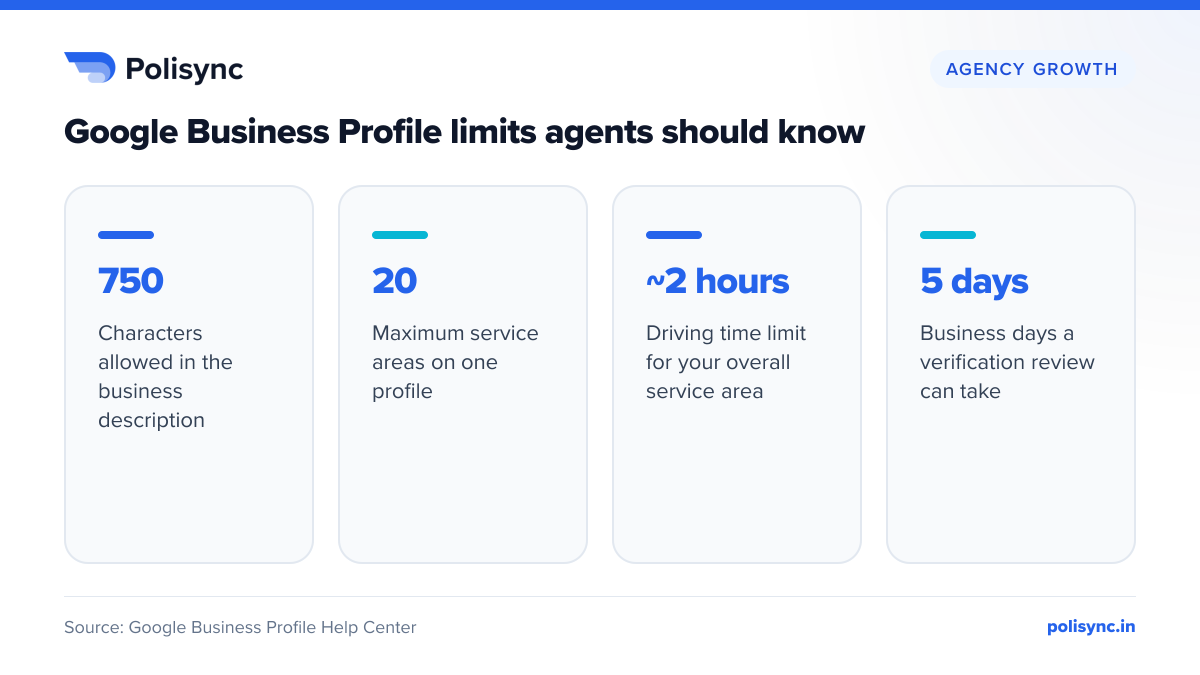
Google allows up to 20 service areas, defined by city, PIN code or similar area rather than a radius, and says the overall area should not extend more than about 2 hours of driving time from your base. An agent in Nashik should not list Mumbai suburbs just to appear in a bigger market.
Individual agent or agency profile?
Google's guidelines name insurance agents, alongside doctors, lawyers and financial planners, as individual practitioners: public-facing professionals with their own customer base who can be contacted directly at the verified location during stated hours. Support staff should not create profiles, and sales associates or lead-generation agents for corporations are not eligible.
If you are the only public-facing practitioner at a branded location, Google says it is best to share one profile named '[brand]: [practitioner name]'; Google's example is 'Allstate: Joe Miller', from a US insurer. Where several practitioners work at one location, the organisation gets its own profile and each practitioner's profile carries only their own name.
Most Indian agents run their own office rather than an insurer-branded branch, so a profile in your own or your agency's real-world name is usually cleaner. In a team office, create one agency profile; public-facing agents may add personal profiles, but office staff should not.
How do you set up a Google Business Profile step by step?
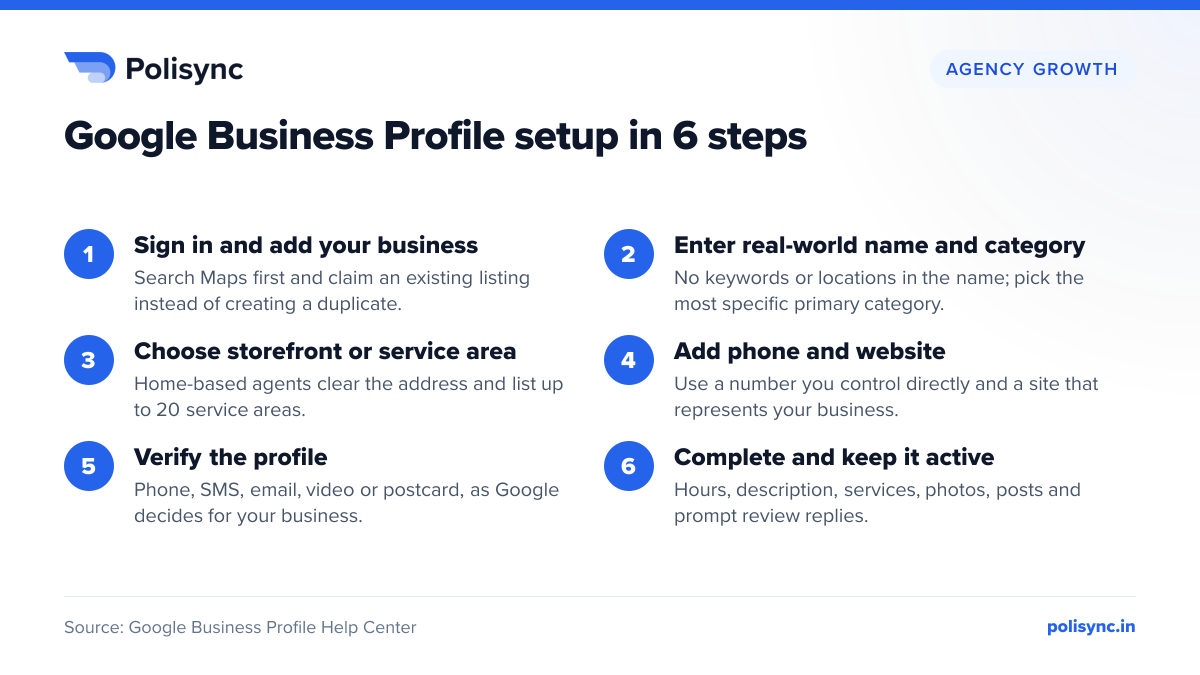
Google's add or claim your Business Profile page starts at business.google.com/add. First search Google Maps for your name and city: if an unverified listing already exists, claim it instead of creating a duplicate, and if someone else has verified it, request ownership. Then work through these six steps.
- Sign in and add the business: use a Google account you control long-term, ideally a business account rather than a personal one.
- Enter your real-world name and primary category: more on both below.
- Choose storefront, service-area or hybrid: add the office address or clear it, then add up to 20 service areas.
- Add contact details: a phone number under your direct control and your website, if you have one.
- Verify: follow whichever method Google offers you (see the next subsection).
- Complete the profile: hours, 750-character description, services, photos and your first post.
How does verification work?
Google's verification help page describes phone or SMS, email, live video call and postcard methods, plus a separate option to verify with a video recording. You cannot pick freely: Google says methods are automatically determined, depend on your business type, public info, region or business hours, and sometimes more than one is needed.
Practical points for agents:
- Verification reviews take up to 5 business days, and on rare occasions longer.
- Most postcard codes arrive within 14 days and expire after 30 days. Do not edit your name, address or category while waiting.
- Live video calls run only during business hours. Be at your office, ready to show outside signs or a street sign, your marketing materials, and proof you manage the business, such as keys or employee-only areas.
Which Google Business Profile category should an insurance agent choose?
The primary category is the single label that tells Google what kind of business you are. Google's category guidance says to pick a specific category from the list that appears as you type, that you cannot create your own, and that you should add a few additional categories rather than one for every product or service. Adding or editing a category may lead Google to ask you to verify again.
Type 'insurance' into the category box and choose from what Google shows. Names you may see include these; treat them as examples and confirm the exact wording in your dashboard:
- Insurance agency: a sensible default for a multi-line agent.
- Life insurance agency or Health insurance agency: for agents focused on one line.
- Auto insurance agency: a possible additional category for motor business.
- Insurance broker: only with an IRDAI broker licence. An agent or POSP is not a broker, as our guide to POSP vs agent vs broker explains.
Google's guidelines say categories should complete the statement 'This business IS a', not 'HAS a', and must never be used purely as keywords. If a specific category is not offered, choose a more general one.
What name should you use, and can you use your insurer's brand?
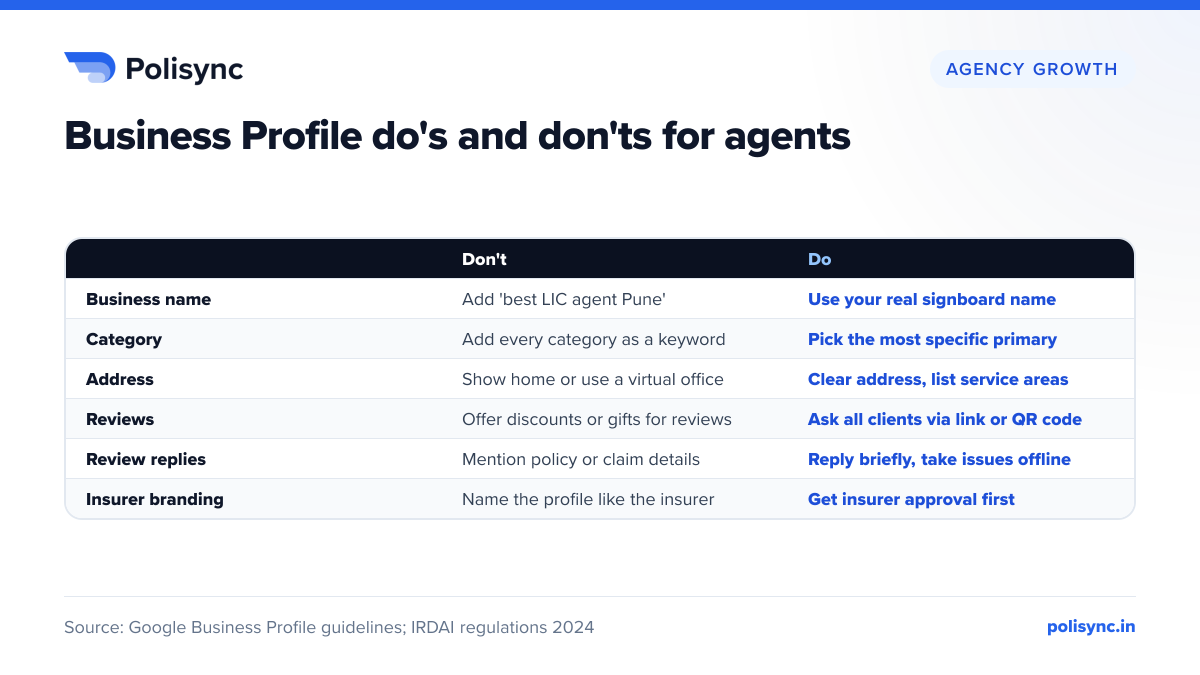
Your profile name must match your real-world name, as used consistently on your signboard, visiting card, website and letterhead. Google's guidelines bar adding marketing taglines, service or product information, location information, phone numbers, website addresses and fully capitalised words to the name, and warn that unnecessary information in a name could lead to suspension.
Illustrative examples for a Pune-based agent:
- Acceptable: 'Sharma Insurance Services' or 'Priya Sharma', if that is how the business is actually known.
- Not acceptable: 'Sharma Insurance Services Best LIC Health Term Insurance Agent Pune'. This is keyword stuffing, and Google reserves the right to suspend profiles that break its guidelines.
- Not acceptable: 'SHARMA INSURANCE' in capitals, or a name with your mobile number appended.
Insurer names, logos and IRDAI advertisement rules
Tied agents often want to use their insurer's name or logo. Be careful. Regulation 6(1)(c) of the IRDAI (Insurance Products) Regulations, 2024, notified on 20 March 2024, requires all advertisements issued by an insurer and its distribution channels to be approved through the insurer's Board-approved advertisement committee.
The IRDAI (Protection of Policyholders' Interests, Operations and Allied Matters of Insurers) Regulations, 2024, effective from 1 April 2024, count insurance agents as distribution channels. Regulation 28 says an advertisement issued by a distribution channel representing an insurer must be approved by the insurer in writing before it is issued. Regulation 27 bars giving the impression that you offer products directly and says social media content must also comply.
The definition of advertisement is broad: any communication to the public meant to influence prospects, including brand (institutional) advertisements. A profile or post featuring an insurer's name, logo or plans can fall within it.
What this means in practice:
- Do not name your profile like the insurer, for example 'LIC Office Andheri'. That implies you offer products directly.
- Ask your branch or the insurer's compliance team whether you may use its name or logo and which approved creatives you may post.
- Treat plan-specific posts as advertisements. Our IRDAI compliance checklist for agents covers the wider rules.
How do you optimise services, description, photos and posts?
Google's tips to improve local ranking include complete, accurate information and photos. Here is how each section applies to an agent.
Description
You get 750 characters. Google's edit profile guidance suggests covering what you offer, what makes you special and how long you have been in business, with no URLs or HTML and no focus on promotions or prices. Mention your insurance lines, languages and whether you help with claims and renewals.
Services
You can list services from Google's suggestions or as custom entries, such as term insurance advice, family health cover, motor renewal and claim assistance. Google rejects custom service names containing prices or phone numbers.
Photos
Add a logo, cover photo, office photos and a clear photo of yourself. Google's photo guidelines ask for JPG or PNG files of 10 KB to 5 MB, recommend 720 x 720 pixels, and say photos should represent reality.
Posts
Google offers update, offer and event posts. Posts older than 6 months are archived unless a date range is set, and an unverifiable phone number can get a post rejected. Try renewal reminders, claim document checklists or a policy review camp.
What happened to Q&A?
Google discontinued the Business Profile Q&A API on 3 November 2025, saying it was updating the Q&A experience. A January 2026 industry analysis reports that the public Q&A section has been replaced by AI-generated answers drawn from your website, profile and reviews. Put your FAQs on your own website and keep your description and services detailed.
Four Google limits are worth keeping in mind while you set up the profile.
How should insurance agents get and respond to Google reviews?
Reviews are the clearest trust signal for a financial adviser, and Google's local ranking page says more reviews and positive ratings can help your ranking. The rules on collecting them, though, are strict.
Google's fake engagement policy prohibits:
- Offering payment, discounts, free goods or services in exchange for reviews. A premium discount or gift voucher for a five-star review is a violation.
- Reviews based on a conflict of interest, which Google says can include employment and family relationships, so not from your sub-agents, staff or relatives.
- Discouraging negative reviews, or selectively asking only happy clients.
- Pressuring clients to review while at your office, or asking for specific content.
What Google does allow is simple: ask every client for honest feedback about a genuine experience. Its tips to get more reviews suggest sharing a Google review link or QR code. Natural moments are after a policy is delivered, after a claim is settled or after a renewal is done. The same moments work for referrals, as our guide on how to get insurance referrals explains.
How to reply to reviews
Google's review-reply tips ask you to be professional and polite, keep replies short, apologise when appropriate and respond in a timely manner. For agents, add three rules of your own:
- Never mention policy numbers, health conditions, claim amounts or premiums in a public reply. Those are personal data, as our DPDP Act guide for agents explains.
- Take complaints offline: acknowledge the issue, share your office number and resolve it privately.
- Write a specific reply to each review. Calm, factual replies to critical reviews build client trust more than a wall of five-star ratings.
How does Google rank local results, and what can agents influence?
Google says local results are mainly based on relevance, distance and popularity, and explains the third factor under the heading prominence. Relevance is how well a profile matches what someone is searching for. Distance is how far the business is from the person searching. Prominence means how well known the business is, and Google says it is also based on how many websites link to the business and how many reviews it has.
What you can influence:
- Relevance: accurate categories, a detailed description and a full services list.
- Distance: fixed, so stuffing distant cities into your service area does not help.
- Prominence: genuine reviews with replies, and links from directories, local associations or news coverage.
Keep your NAP (name, address, phone number) identical on your website, visiting cards, WhatsApp Business profile and directories, so every listing clearly belongs to the same agent.
Measuring results with Performance insights
The Performance section of your profile shows how people find and interact with you: views on Search and Maps, the search terms used, calls, website clicks, direction requests, messages and bookings. Google notes the searches metric updates at the start of each month and can take up to 5 days to appear.
Review these once a month:
- Search terms: are people finding you for 'health insurance agent' or only for your name? The first shows relevance is working.
- Calls and direction requests: the best proxy for real enquiries.
- Trend after changes: compare the month after adding services, photos or posts with the month before.
How does your Google Business Profile affect AI search visibility?
AI assistants and Google's own AI features increasingly answer local questions directly. If the industry reports on the Q&A change are right, Google now draws on your website, profile details and reviews to generate answers about your business. A complete, consistent profile is part of the same foundation covered in our guide to insurance agents and ChatGPT or AI search visibility.
Consistent listings elsewhere help too.
What this means for insurance agents: a 10-point checklist
- Claim any existing Maps listing before creating a new one.
- Use your real-world name with no keywords, locations or phone numbers.
- Choose the most specific primary category and only a few additional ones.
- If clients do not visit your home, clear the address and list up to 20 service areas.
- Verify with the method Google offers, with signage and materials ready for video.
- Add a 750-character description, services, hours, a logo and real photos.
- Check with your insurer before using its name, logo or product creatives.
- Ask every client for an honest review by link or QR code, with nothing offered in return.
- Reply to every review promptly without revealing policy or personal details.
- Check Performance insights monthly and keep your NAP identical everywhere.